
Seeing Into a Talos Cluster: The Observability Stack I Actually Run#
kubectl logs is not observability. It is a flashlight you point at one pod after you already know which pod broke.
By default a Kubernetes cluster tells you almost nothing. A pod flaps and recovers before you open a terminal. A certificate expires and the first sign is a browser warning. Something runs a shell inside a container at three in the morning and nobody hears about it. You find out when a user does.
The two ways people get this wrong are running nothing, or bolting on the full enterprise suite and drowning in dashboards nobody opens. This is the middle path. Three pillars (metrics, logs, traces) plus runtime security, each component earning its place by answering one question, all of it funnelling into a single screen.
If you find this useful or just appreciate the over-engineering, drop a ⭐ on the Homelab repo.
One Screen First#
This is the screen I check first when something feels off. One dashboard, the global summary pinned at the top, and every domain in the cluster a row below it that I expand when I need to drill in.
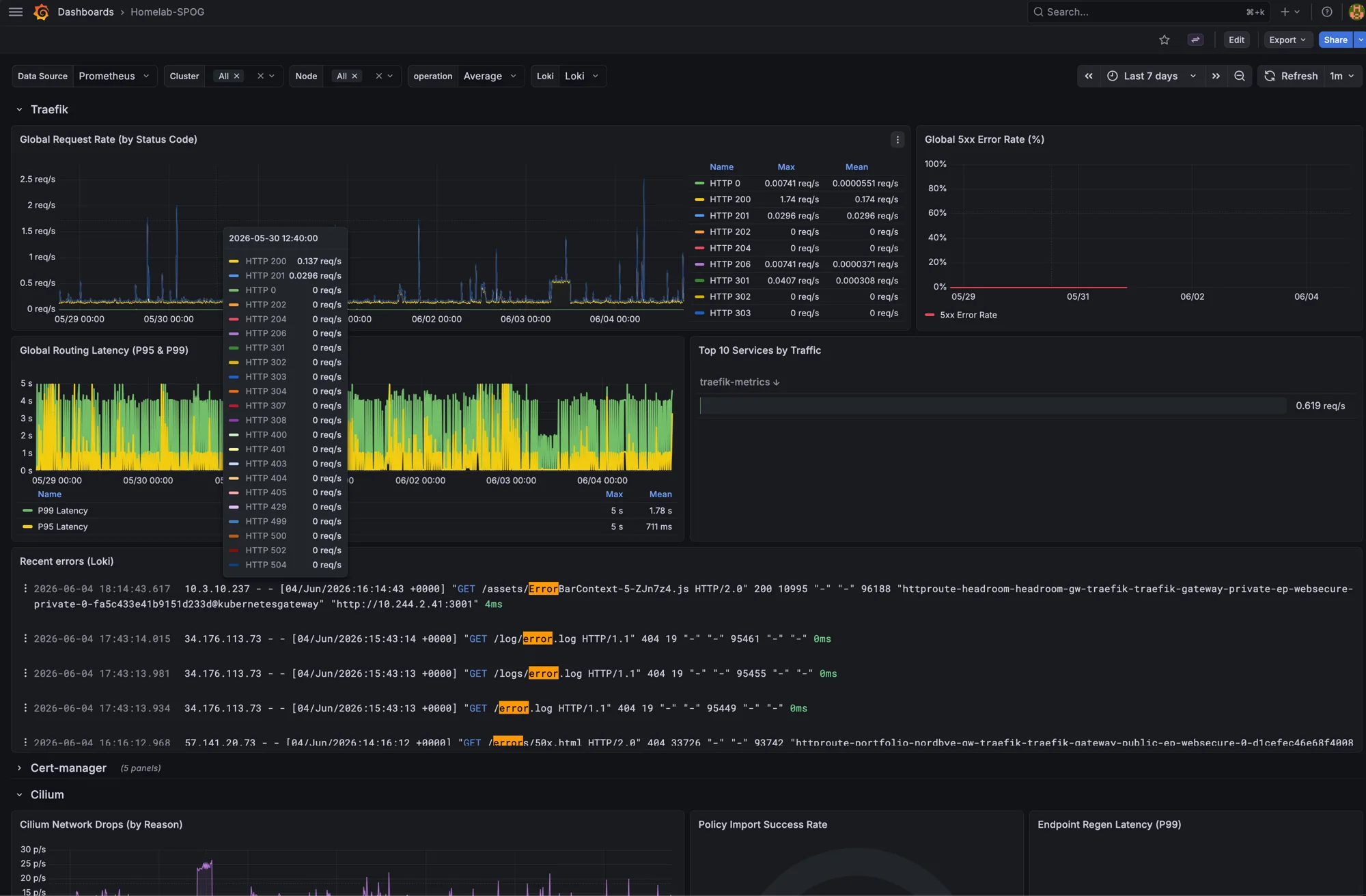
It is my own Homelab-SPOG, for single pane of glass. The summary row up top carries request rate, latency and the 5xx rate. Below it sit collapsible sections for each part of the cluster: Traefik, cert-manager, Cilium, CoreDNS, the public sites, ArgoCD, Falco, per-node health and storage. The JSON is in the repo if you want to copy what you like.
Every panel on that screen is the visible end of a decision I had to make and would have to defend in a design review. What store, what retention, what to scrape and what to ignore, what to alert on and what to leave on the dashboard. The rest of this post walks back from the panels to those decisions, one pillar at a time. Whether your cluster runs four pods or four hundred, the questions are the same. Only the blast radius changes.
Here is how the data reaches that screen.
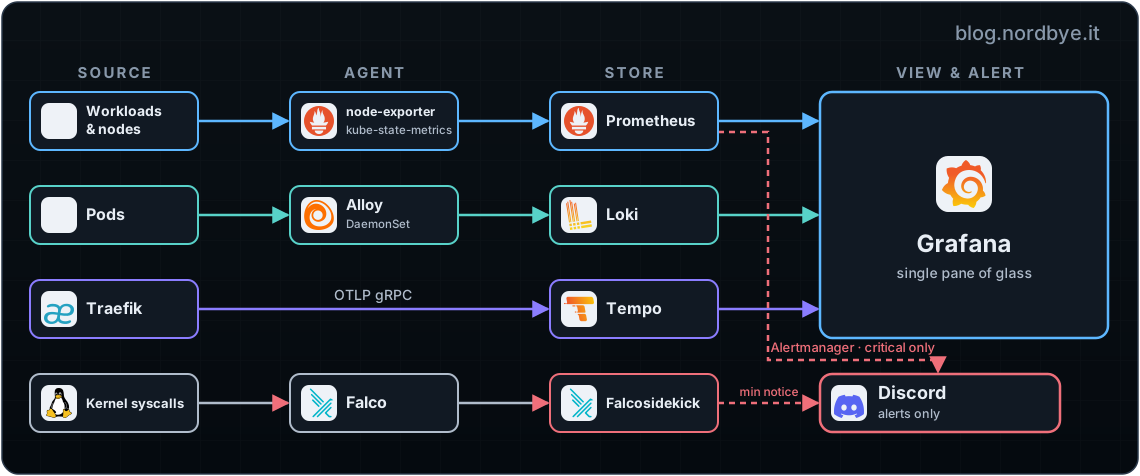
Four sources on the left, four stores in the middle, one Grafana on the right, and one path that does not stop at a dashboard. Alerts go to Discord. Nothing in the cluster is special-cased. Every workload is scraped, tailed and watched the same way.
Metrics: What Is the Cluster Doing?#
The request rate, latency and 5xx panels across the top of the dashboard all come from here. This is the foundation. kube-prometheus-stack gives you Prometheus, Grafana, Alertmanager, node-exporter and kube-state-metrics in one Helm release that wires itself together.
The defaults scrape the whole managed control plane. Most of those targets I switch off.
Full file: kube-prometheus-stack/values.yaml
prometheus:
  prometheusSpec:
    retention: 7d
    scrapeInterval: 30s          # not chasing sub-minute resolution on a homelab

## Minimal monitoring of k8s components
kubeApiServer:
  enabled: false
kubeControllerManager:
  enabled: false
kubeEtcd:
  enabled: false
kubeScheduler:
  enabled: false
kubeProxy:
  enabled: false                 # Cilium replaced kube-proxy; there is nothing to scrape
On Talos the control plane sits behind locked-down endpoints, and scraping etcd or the scheduler means extra wiring for metrics I would almost never act on. So I monitor what breaks workloads, not the managed control plane. In a regulated production cluster you would scrape the control plane for capacity planning and audit trails. Here the cost outweighs the payoff, and that is a trade-off worth making on purpose rather than by inheriting a chart default.
The kube-proxy line is the one worth pausing on. I run Cilium in kube-proxy replacement mode and Talos starts no kube-proxy at all, so that scrape target points at a process that does not exist. Leave it enabled and that target fails on every scrape and never recovers. Worth checking your own scrape config against what is actually running. Network-drop visibility comes from Cilium anyway, in the Cilium section of the same dashboard.
node-exporter and kube-state-metrics carry the weight. The per-node section of the dashboard is what that buys you.
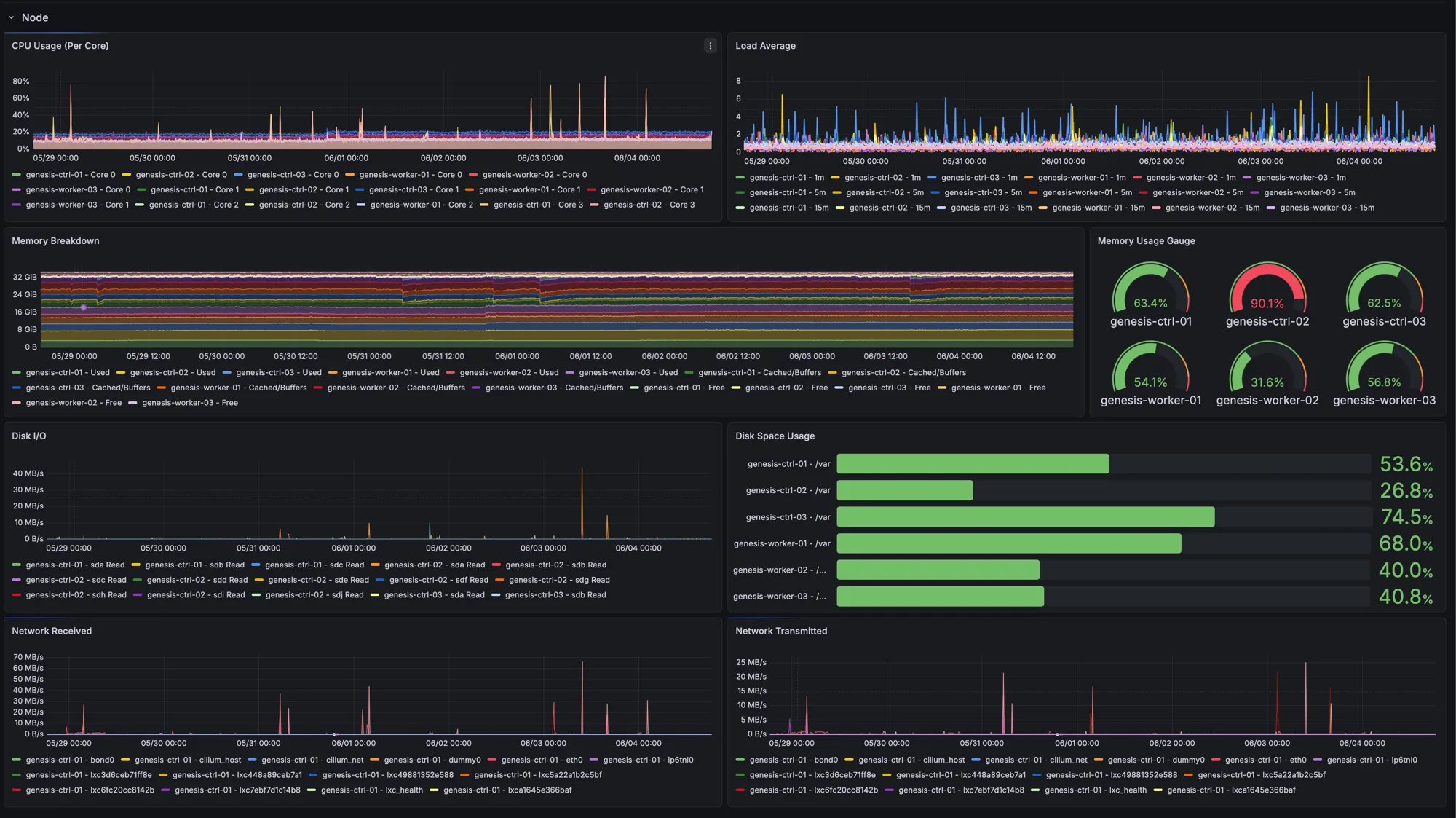
This is the section I actually look at. One glance and I know which node is under pressure and which has headroom. When a control-plane node sits this hot, it is the closest I get to a defensible reason for more hardware. For once another Proxmox node is fixing a problem, not feeding the hobby.
One trade-off to copy with your eyes open. Retention is 7 days, and Prometheus writes to Synology NFS rather than local disk. That is a durability choice. The data survives a node reboot, and metrics queries are infrequent enough that the network round trip does not hurt.
Logs: What Did It Say Before It Died?#
Metrics tell you a pod restarted. They do not tell you why. For that you need the lines it printed on the way down, and that is the “Recent errors” panel on the dashboard.
Loki stores the logs. Alloy collects them, a DaemonSet on every node that discovers pods through the Kubernetes API and ships their logs to Loki. If you remember Promtail, Alloy is its supported successor. Promtail reached end of life, so new clusters should start on Alloy.
The discipline that matters is label hygiene. Every label you attach becomes part of Loki’s index, and a fat index is how Loki gets slow and expensive.
Full file: loki/alloy-values.yaml
// Map k8s discovery metadata to stream labels.
// Keep this list short. Every label here becomes part of Loki's index.
discovery.relabel "pod_logs" {
  rule {
    source_labels = ["__meta_kubernetes_namespace"]
    target_label  = "namespace"
  }
  rule {
    source_labels = ["__meta_kubernetes_pod_name"]
    target_label  = "pod"
  }
  // ...container, app, k8s_app
}
Five labels, no more. namespace, pod, container, app, k8s_app. Everything else stays out of the index and lives in the log line itself, where a full-text search can still reach it without inflating what Loki has to keep in memory.
Two Helm mounts in the same file decide whether any of this works.
mounts:
  varlog: true            # /var/log
  dockercontainers: true  # Talos uses containerd; reaches the symlinked log files
That dockercontainers: true line is the Talos gotcha. The name is a historical artifact. Talos runs containerd, not Docker, but the container log files still live behind the path that mount exposes. Leave it off and Alloy comes up healthy, discovers every pod, and ships nothing. No error, just an empty Loki. If your Loki is empty while Alloy looks healthy, this mount is the first thing to check.
The payoff is the “Recent errors (Loki)” panel up top. Those GET /log/error.log and /errors/50x.html lines returning 404 are bots probing the public ingress for files that do not exist, not my apps misbehaving. Metrics would have shown you a small bump in the 404 rate. The logs show you who, from where, looking for what. That is the difference between the two pillars, sitting in one panel.
Pod logs keep 24 hours, on local block storage rather than NFS. Kubernetes events get their own stream and live 7 days, because they are the breadcrumbs you want when reconstructing what happened days after it happened.
Full file: loki/values.yaml
deploymentMode: SingleBinary   # one process; no microservices sprawl for a homelab
limits_config:
  retention_period: 24h        # pod logs: a day is plenty
  reject_old_samples_max_age: 24h
  retention_stream:
    - selector: '{job="kubernetes-events"}'   # events outlive the logs: 7 days
      period: 168h
persistence:
  size: 20Gi
  storageClass: "proxmox-local"  # Proxmox CSI on the host's local SSD, not NFS
Logs are written constantly and rarely read after a day. Local disk gives the write throughput, and if the disk dies I lose a day of logs I almost certainly was never going to open. That is an acceptable loss. Metrics get NFS for durability, logs get local for throughput.
Traces: Where Did the Request Actually Go?#
A request comes in through Traefik, hits a service, which calls another service, which queries something. When it is slow, which hop ate the time? Metrics give you an aggregate. A trace gives you the single request, hop by hop.
Tempo stores traces. Traefik emits them. Because Traefik already speaks OTLP (the OpenTelemetry wire protocol), Tempo only needs the OTLP receiver and none of the legacy ones.
Full file: tempo/values.yaml
tempo:
  retention: 24h
  # OTLP-only: Traefik pushes OTLP. Drop the jaeger/zipkin/opencensus receivers.
  receivers:
    otlp:
      protocols:
        grpc:
        http:
Dropping the legacy receivers buys more than tidiness. Every receiver you enable is a listening port and a parser you do not use. It is the same instinct as the disabled control-plane scrapes. Fewer listening ports and fewer parsers mean less to reason about when something misbehaves.
The Traefik side is one block, and the number in it is the opinionated bit.
Full file: traefik/values.yaml
# Emit OTLP traces for every ingress request to Tempo (blog.nordbye.it included).
tracing:
  serviceName: traefik
  sampleRate: 1.0                # 100%. Every request gets a trace.
  otlp:
    enabled: true
    grpc:
      enabled: true
      endpoint: tempo.monitoring:4317
      insecure: true
sampleRate: 1.0 means every single request through the ingress gets a trace. Reload this post and your request shows up in Tempo. In production you would never do this. At a few requests per second the cost is nothing, and full sampling means when something is slow I have the trace, not a one-in-a-thousand chance of having kept it. Where this breaks is traffic. Push real volume through 100% sampling and you drown Tempo in spans and pay for storage you will never query. Name the request rate where you would turn it down, and turn it down before you hit it. The production answer is tail-based sampling, which keeps the slow and errored traces and throws the boring ones away.
Runtime Security: Who Is Doing Something They Should Not?#
The first three pillars tell you what your applications did. Falco tells you what they did that they were never supposed to, and feeds the runtime-security panel on the dashboard. It watches syscalls and flags the suspicious ones. A shell spawned inside a container, a process reading /etc/shadow, an outbound connection from a pod that has no business making one.
On Talos there is exactly one way to run it.
Full file: falco/values.yaml
# modern eBPF: the only driver that works on Talos (no kernel headers).
driver:
  kind: modern_ebpf
Talos is immutable and ships no kernel headers, so the classic kernel-module driver is a non-starter. The modern eBPF probe needs neither. This is the line that makes Falco run on Talos at all.
Out of the box Falco is loud. It fires on things that are perfectly normal for your cluster, and a security tool that cries wolf gets muted within a week. The wrong fix is to delete the noisy rules. The right fix is to tell the existing rules which specific behaviour is known and expected, through the template macros the upstream rules already read.
customRules:
  tuning.yaml: |-
    # Cilium CNI plugin execs from /opt/cni/bin on every node. Not a workload.
    - macro: known_drop_and_execute_activities
      condition: (proc.name=cilium-cni and proc.exepath startswith /opt/cni/bin/)
      override:
        condition: replace

    # kubelet and Authentik wire stdio to sockets legitimately. Scoped to those
    # binaries so a real interactive shell still alerts.
    - macro: user_known_stand_streams_redirect_activities
      condition: (proc.name=kubelet) or (container.image.repository=ghcr.io/goauthentik/server and proc.name=authentik)
      override:
        condition: replace
The override: condition: replace is the part worth stealing. It extends the macro the rule already consults for behaviour that is known and fine, instead of disabling the rule or raising a threshold. When the upstream chart ships new rules, my exceptions still apply, because they hang off the macro, not off a specific rule I forked. That is the difference between tuning that survives the next chart bump and tuning you re-litigate every time.
Note the scope. The kubelet exception names the kubelet binary. A random shell redirecting its streams to a socket still trips the alert, because it is not kubelet. You are carving out the known-good case narrowly, not waving everything else through.
This is what one looks like when it reaches Discord, and it doubles as the next item on the list.
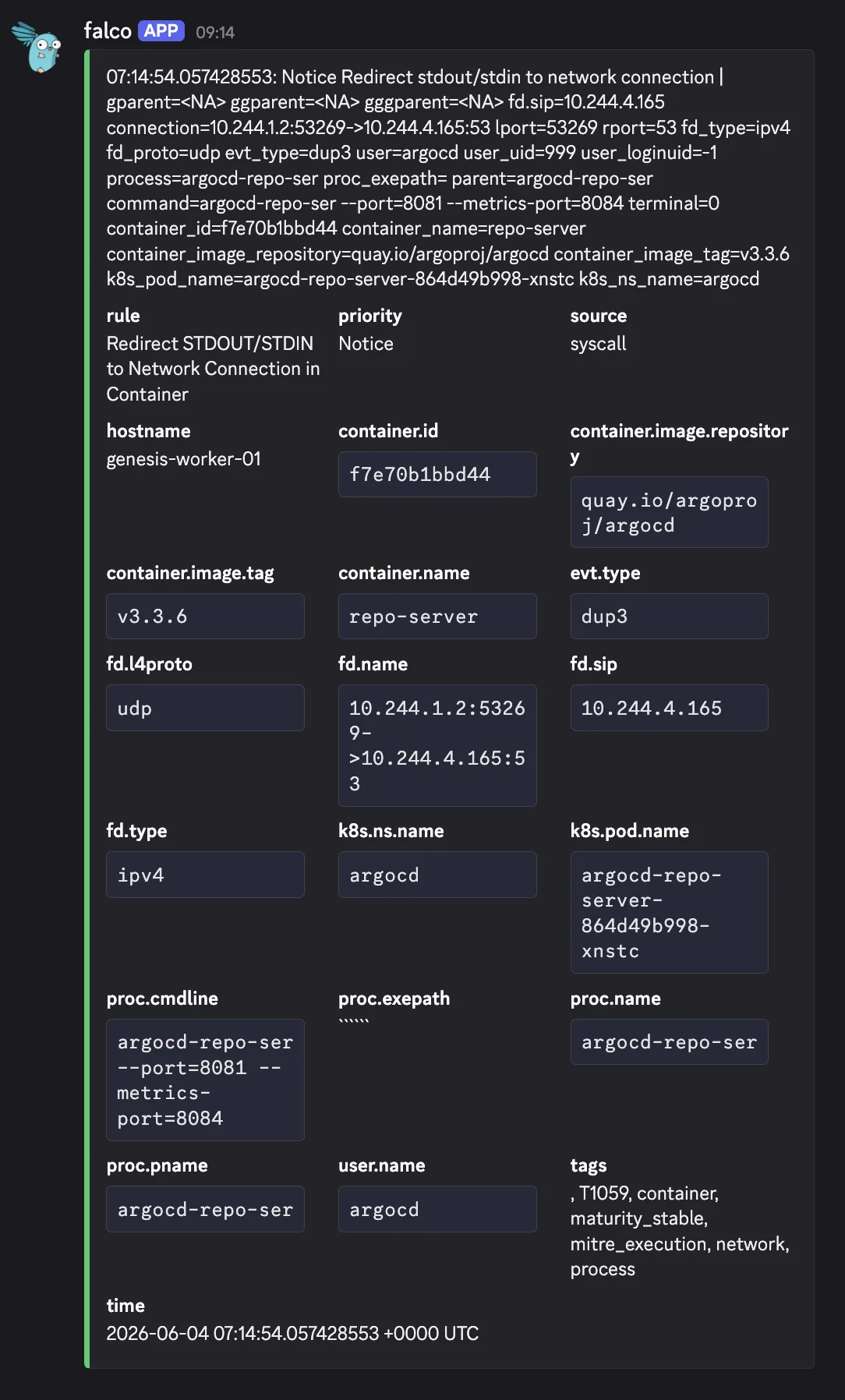
That is argocd-repo-server wiring stdout to a udp port 53 socket, which is the repo server resolving DNS. Benign, and the same stdio-to-socket shape as the kubelet and Authentik cases above. It still fires because I have not added it to the macro yet. It is the next line in that tuning block, scoped to the argocd-repo-ser process (Linux truncates the process name at fifteen characters) so a real shell in that pod still trips. Tuning is never finished. It is a list you work down as the cluster tells you what normal looks like.
Alerting That Earns Its Keep#
A dashboard waits for you to open it. An alert interrupts you whether you are looking or not. The failure mode is alerting on everything, which trains you to ignore the channel. So almost nothing reaches me.
Full file: kube-prometheus-stack/values.yaml
route:
  receiver: "null"             # default: drop it
  routes:
    - matchers:
        - severity = "critical"
      receiver: discord        # only critical climbs out to Discord
Everything that is not critical goes to a null receiver and disappears. Only critical reaches me. If an alert is not worth a Discord ping, it is not worth firing, and if it fires too often it gets demoted or fixed.
It was not always this quiet. Here is Discord on 23 May, when the route still sent everything to the channel.
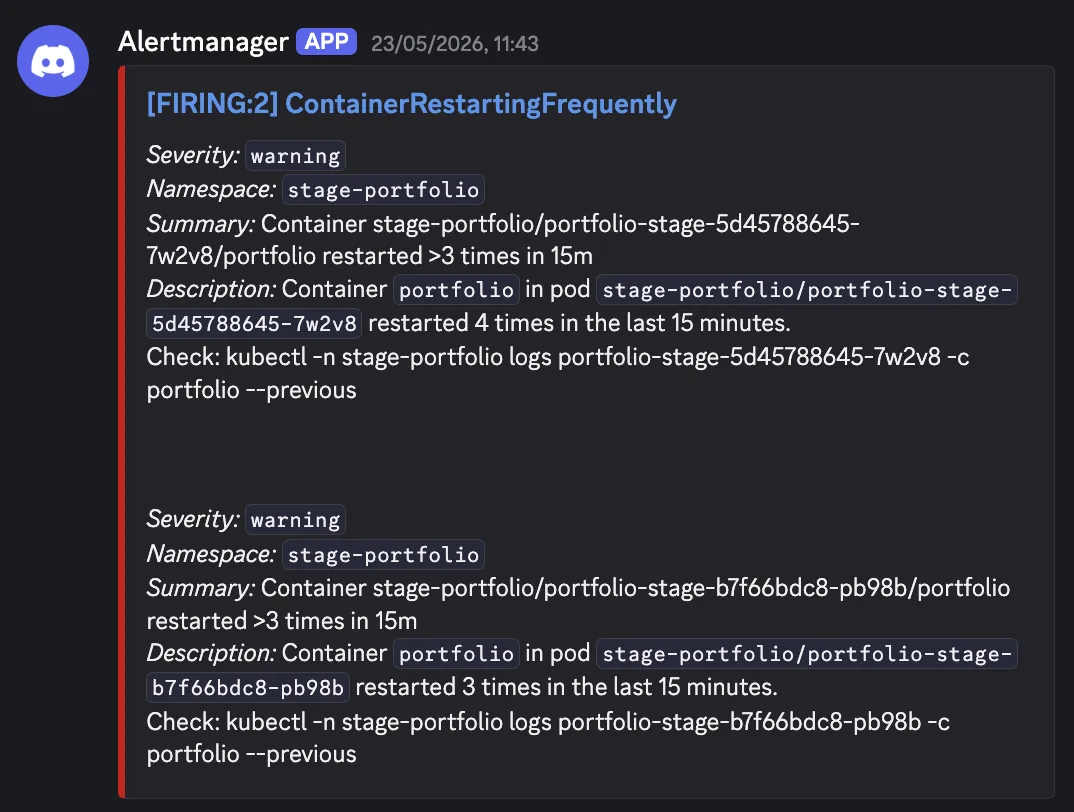
Two stage-portfolio pods restarting more than three times in fifteen minutes. Severity warning. Useful the first time I saw it, noise by the tenth. On 31 May I flipped the default receiver to null and left only critical wired to Discord. Warnings live on the dashboard now, where I look when I want them, not in a channel that buzzes at people. One thing to keep from that message though. The description carries the exact kubectl command to run next, so the message hands you the first step of the fix.
There is a Discord gotcha here that cost me a confused half hour. Alertmanager has no native Discord receiver. The trick is to point a slack_config at Discord’s Slack-compatibility endpoint, and the webhook URL has to end in /slack or Discord rejects the Slack-shaped payload with an HTTP 400. The URL itself lives in Bitwarden and is mounted as a file, never committed.
receivers:
  - name: "null"
  - name: discord
    slack_configs:
      - api_url_file: /etc/alertmanager/secrets/alertmanager-discord-webhook/url
        send_resolved: true
The rules behind those messages take more thought than the routing does. Two examples from homelab-alerts.yaml that I got wrong before I got right.
# Catches early flapping before CrashLoopBackOff. The upstream KubePodCrashLooping
# only fires after 15 min sustained; this catches the restart storm earlier.
- alert: ContainerRestartingFrequently
  # increase() is the raw restart count over the window; rate() would give per-second and bury the storm.
  expr: increase(kube_pod_container_status_restarts_total[15m]) > 3
  for: 2m

# last_terminated_reason stays 1 forever after an OOM, so AND it with a recency
# check on the timestamp. Otherwise the alert never clears once it has fired once.
- alert: ContainerOOMKilled
  expr: |
    kube_pod_container_status_last_terminated_reason{reason="OOMKilled"} == 1
    and on(namespace, pod, container)
    (time() - kube_pod_container_status_last_terminated_timestamp) < 600
  for: 1m
The OOM one is the kind of thing you only learn by getting it wrong. The metric is a sticky gauge. Once a container is OOMKilled it reads 1 for the rest of that pod’s life. Alert on the raw value and you get a notification that never resolves, which is just noise you trained yourself to ignore. Anding it against the termination timestamp makes it auto-clear once the OOMs actually stop.
The rule of thumb. If an alert fires and you do not act on it, the alert is wrong, not your attention. Fix the threshold or delete the rule.
Common Mistakes to Avoid#
I have made every one of these.
Copying my retention numbers without thinking. 24h of logs and traces suits me because I debug in near-real-time and nothing here is under audit. Under a compliance requirement, or chasing an incident days later, 24h is too short and the line you need is already gone. Where the window has to stay long, move the reading somewhere cheap instead, which is the argument behind querying archived WAF logs straight off a storage account.
Putting high-write data on network storage. Logs and traces are written constantly, so point them at NFS and you will feel it. High-write pillars on local block storage, the metrics you want to keep on durable network storage.
Committing a panel before the metric exists. Dashboards-as-code lets you add a panel for a metric you are not scraping yet. Honest, and a little embarrassing.
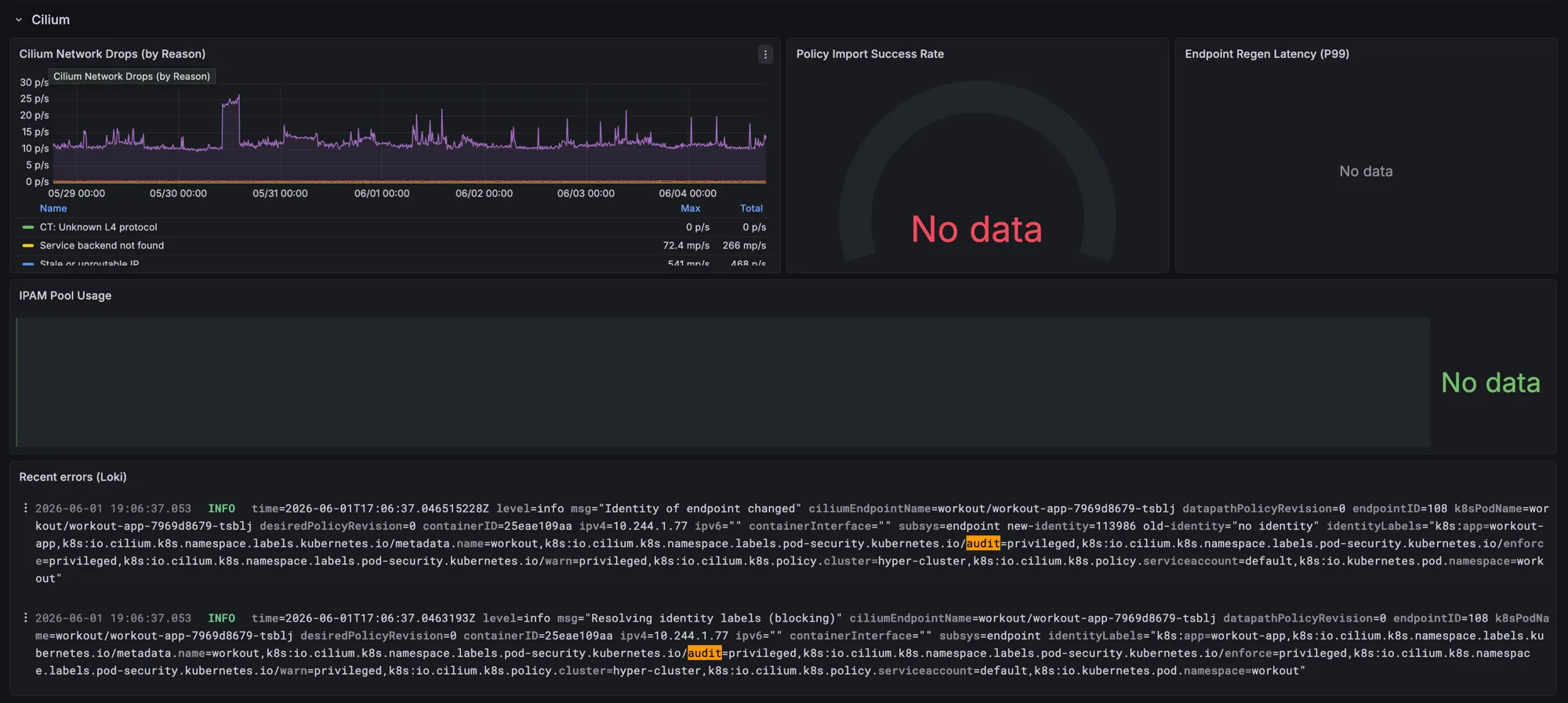
Three “No data” panels next to a working one. The fix is to wire up the Hubble metrics they expect, the same ones I turn on in the Cilium network policy rollout. The panel is a to-do list in git, and I would rather see the gap than pretend it is not there.
Alerting on everything. The instinct is to alert on every rule the internet hands you. Resist it. A channel you have learned to ignore is worse than none, because it feels like coverage while giving you nothing.
The Whole Thing Is in Git#
You have now seen a dozen snippets from as many files. What makes them a system rather than a pile is that they share one source of truth.
The dashboard up top is a ConfigMap, homelab-spog.json, that the Grafana sidecar discovers and loads. Nobody clicked it together in the Grafana UI, where it would vanish the moment the pod restarts. Same for every Helm value, every alert rule, every Falco exception in this post. ArgoCD reconciles all of it from main. If I delete the Grafana pod, the dashboard comes back exactly as it was.
That is the part that makes this maintainable rather than a pet. The cluster is blind by default. What you have read is the wiring that gives it sight, and all of it is text in a repo you can read.
Go clone the dashboard JSON, steal the Falco macros, and turn off an alert that has never once told you anything.