
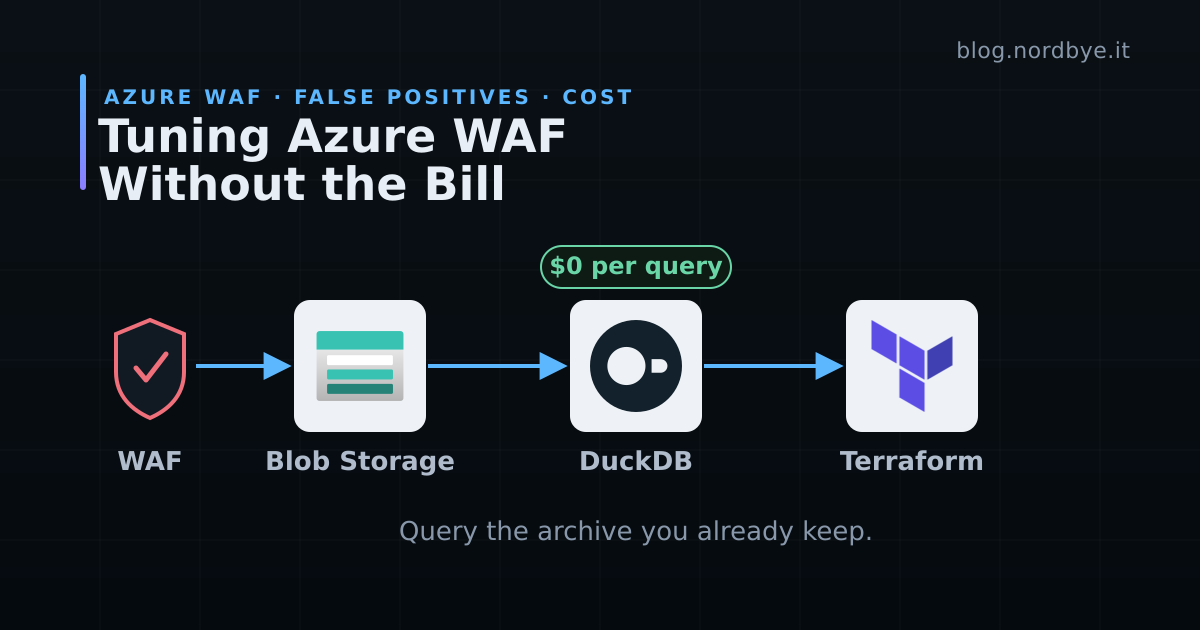
Your Azure WAF just blocked a real customer. Not an attacker, a customer, whose perfectly valid request happened to trip a managed rule. Now you have to prove it was a false positive and write an exclusion that lets them through without punching a hole in the policy.
To do that you need the WAF logs. And the moment you go looking for them, you find out what they cost to read.
This one came out of a customer project and turned into an open-source tool. If it saves you an afternoon or you just appreciate the DuckDB abuse, drop a ⭐ on lawless-waf.
The Bill Nobody Budgeted For#
Azure WAF logs are noisy and high volume. Every blocked request, every anomaly score, every rule that fired writes a line. The standard way to make them queryable is to point diagnostic settings at Log Analytics or Sentinel and search there.
That works, and it bills you per gigabyte ingested. On one Azure environment I worked on, keeping the WAF logs queryable in Log Analytics ran about 3,000 NOK a day, roughly $270, or somewhere north of $8,000 a month. It kept billing whether or not anyone was tuning anything that week. You cannot ingest only the interesting rows for less either. You pay for the volume that lands.
There is another destination for those same logs. A diagnostic setting can write WAF logs to a storage account instead of, or alongside, Log Analytics, and that archive is cheap. On the same environment, a storage account holding the logs with a long retention window came in under 1,000 NOK a month. If you are not sending diagnostics to a storage account yet, it is one setting to add. Once the logs land there, you have a copy you can query for a fraction of a single day of the ingestion bill.
So I stopped ingesting to read them, and started querying that storage account directly.
What lawless-waf Does#
lawless-waf is a small web app and local API that reads your archived Azure WAF logs, whether they come from Front Door or Application Gateway, straight out of the storage account and runs the analysis with DuckDB on your own machine. No ingestion, no Sentinel workspace, no per-query cost. The logs are already there. It just points a fast analytical query engine at them.
Whether you run one WAF policy or forty, the workflow is the same. Download a window of logs, look at what got blocked, decide what is a real attack and what is a false positive, and get the exclusion you need to fix it.
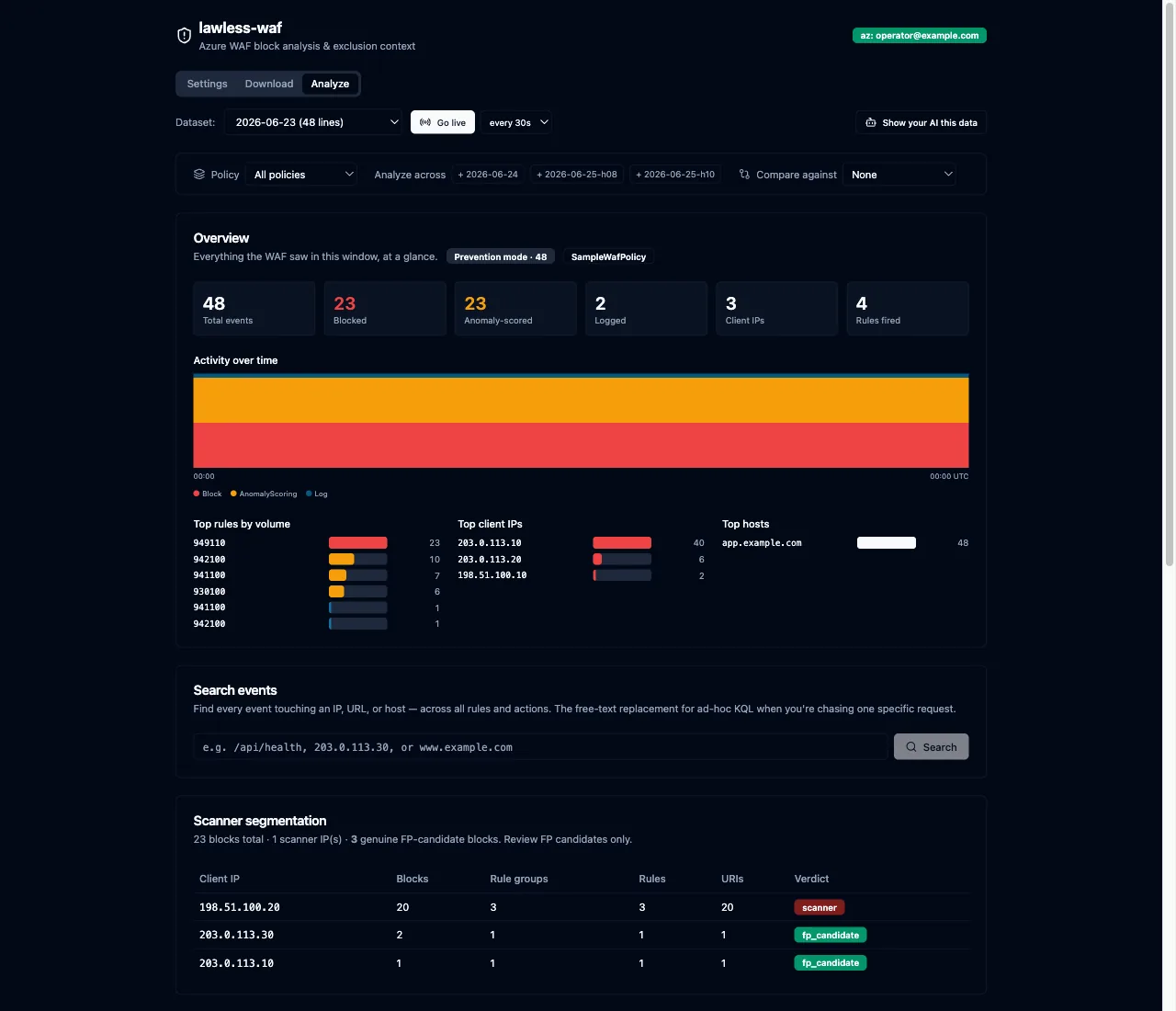
You do not need an Azure subscription to see how it behaves. It ships with a demo mode that seeds synthetic sample days, so you can run the whole thing in about thirty seconds:
docker run --rm -p 127.0.0.1:8000:8000 \
  -e SEED_SAMPLE=true \
  ghcr.io/mortennordbye/lawless-waf:latest
Open http://localhost:8000 and you get the full UI running against fake traffic. This is the quickest way to decide whether the tool is worth pointing at real logs.
When you are ready for the real thing, you log into Azure on the host, mount your credentials into the container, and turn off offline mode. It needs Storage Blob Data Reader on the account your diagnostic logs land in, and nothing else:
az login

docker run --rm -p 127.0.0.1:8000:8000 \
  -v ~/.azure:/root/.azure \
  -v lawless-waf-data:/data \
  -e OFFLINE=false \
  ghcr.io/mortennordbye/lawless-waf:latest
The named lawless-waf-data volume keeps downloaded logs and analysis across restarts, so you are not re-downloading the same day every time you open the tool.
From a Blocked Request to a Terraform Exclusion#
Finding the block is the easy half. The tedious half is turning it into a correct exclusion.
Azure WAF exclusions are narrow by design. An exclusion tells the policy which single part of the request to stop inspecting, named by a match_variable and a selector, and leaves the rest fully inspected. Get the selector wrong and you either fail to fix the false positive or you exclude far more than you meant to.
lawless-waf does that mapping for you. Click into a blocked request and it shows every rule the request triggered, the anomaly score, the affected URIs, how many times it has hit, and the exact match_variable and selector you need. It also flags when a block is not excludable at all, like a multipart body, so you fix it upstream instead of chasing an exclusion that cannot exist.
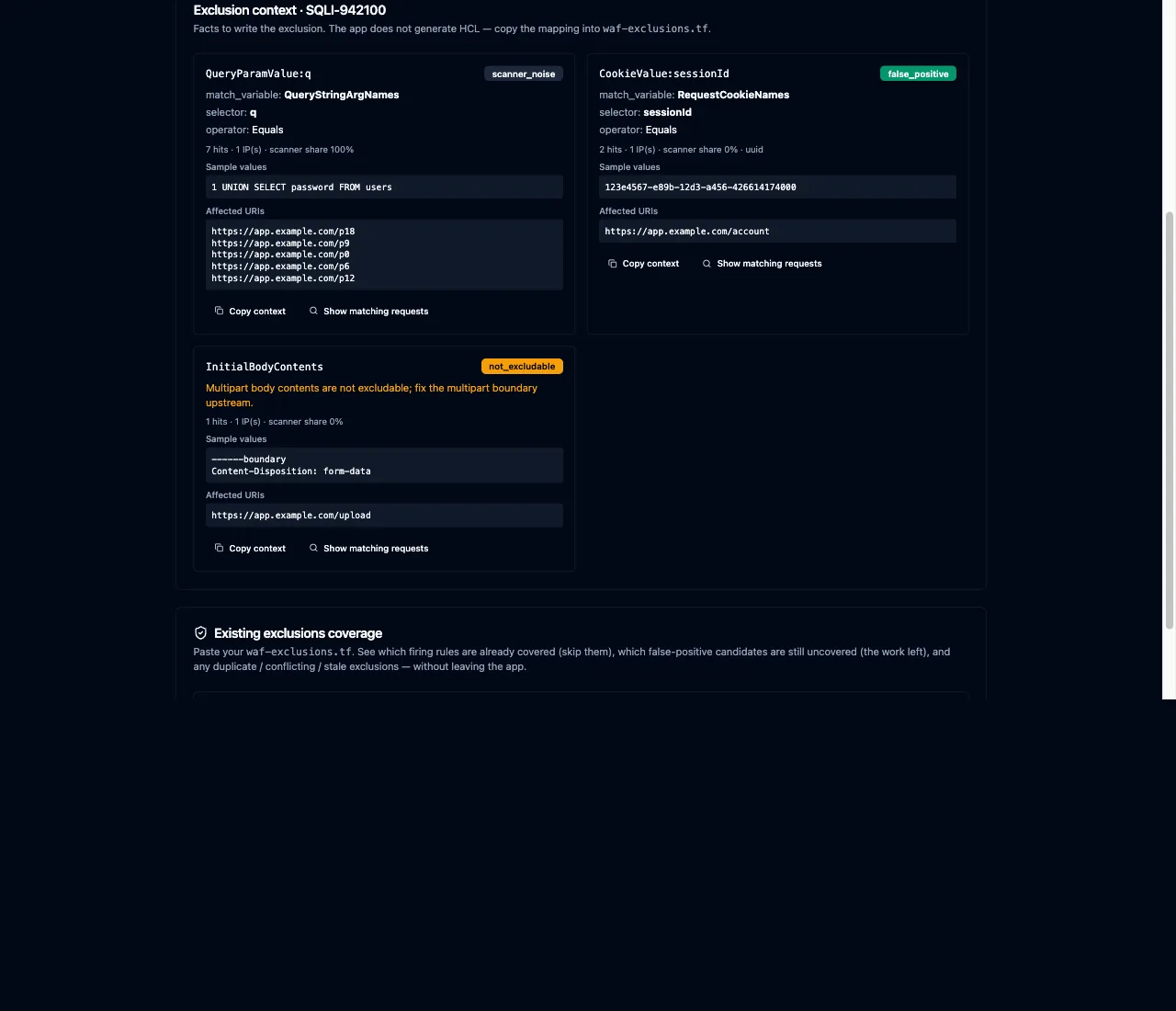
It stops short of writing the HCL for you, which is the right call, since where the exclusion lives in your policy is a decision only you can make. You take the mapping and write the block into your waf-exclusions.tf:
exclusion {
  match_variable = "RequestCookieNames"
  operator       = "Equals"
  selector       = "sessionId"   # the exact cookie that tripped the rule, not the whole request
}
It also checks a request against the exclusions you already have. You point it at the file that holds them, usually a waf-exclusions.tf in your infrastructure repository, and it tells you whether the rule is already covered, so you stop writing duplicate exclusions for something a colleague fixed last sprint.
Pointing it at a file in a Git repository buys you one more thing. It reads the repository, checks the branch, and confirms your exclusions file is in sync with the remote before it reasons about coverage. A stale local checkout is the classic way to decide a rule is missing when it actually shipped last week, or that a request is covered when someone only added the exclusion on a branch that never merged. The sync check keeps the coverage answer tied to the exclusions that are actually deployed, so you know you are working against the right infrastructure repository and not a copy that drifted.
Real Attacks Look Like False Positives Until You Split Them#
A vulnerability scanner hammering your endpoint produces thousands of blocked requests, and they look exactly like the false positive you are chasing. Tune your exclusions against that noise and you will happily write a rule that waves the scanner through.
lawless-waf segments scanner traffic out from the rest before you make a decision. The requests that come from a single IP walking every rule in the catalogue get grouped as scanner noise. What is left is the traffic that looks like your actual users getting blocked, which is what a false positive really is. You tune against that, not against the background radiation.
Once you have shipped an exclusion, you can prove it worked. The before-and-after diff compares a window from before your change against one after and shows whether the blocks you were targeting actually stopped, and whether anything new started getting through that should not.
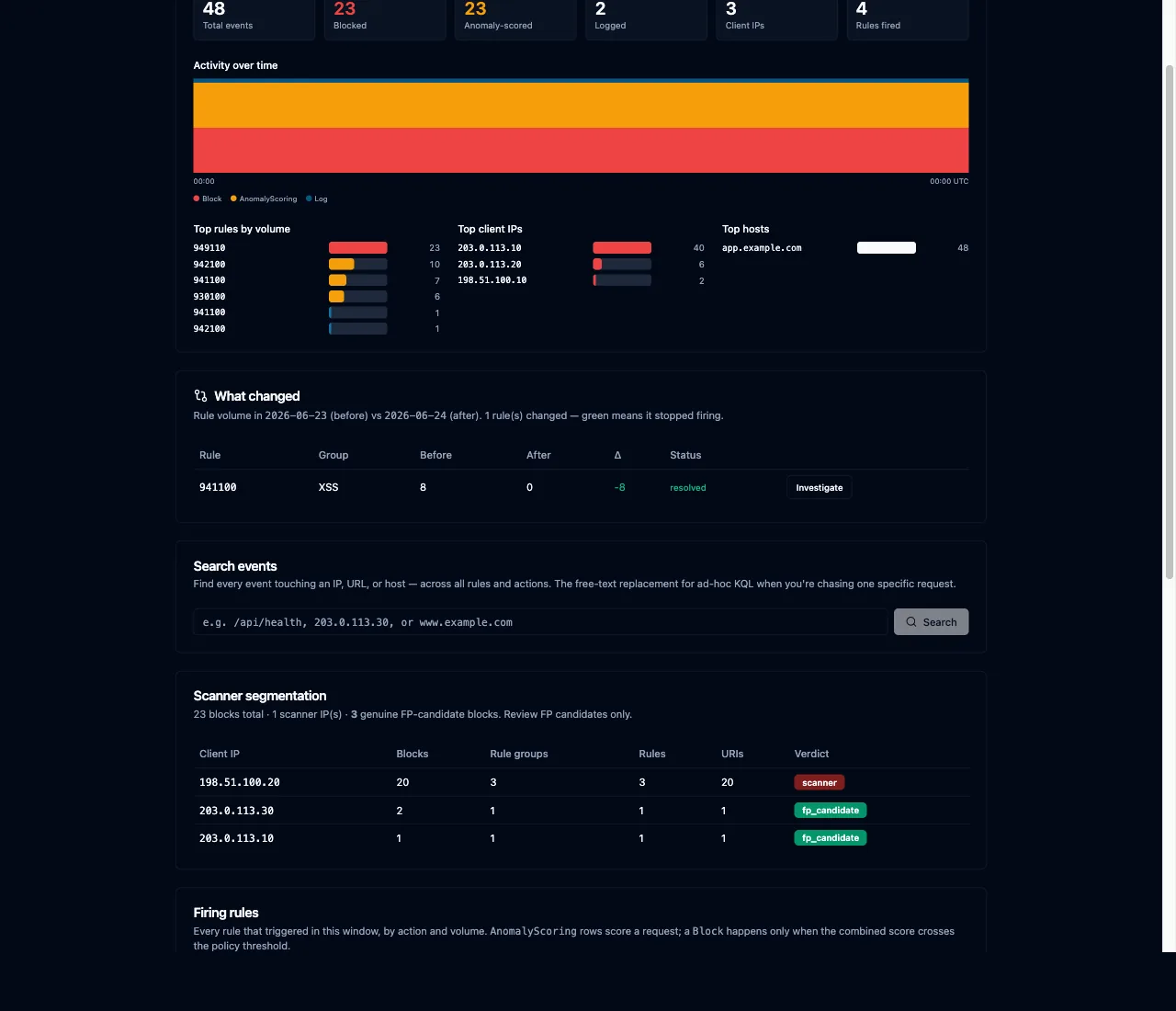
That verification step is the difference between “I think I fixed it” and “the blocks dropped to zero and nothing new leaked.”
Let an Agent Do the Tuning#
Everything the UI does is also exposed over MCP, so an agent like Claude Code can drive the whole loop. make mcp wires it up.
WAF tuning is exactly the kind of tedious, well-defined job an agent is good at. You point Claude Code at a policy and ask why a request is blocked. It pulls the exclusion context, splits the scanner noise from the real false positives, checks your Terraform exclusions for coverage, and proposes the match_variable and selector you need, then reads the before-and-after diff to confirm the change once you ship it. The API, the UI and the MCP server share the same core logic, so the agent works from the same analysis you would.
There Is No Login#
lawless-waf has no application-level login. Access control leans entirely on your Azure credentials and the fact that it binds to localhost. That is deliberate for a tool you run on your own laptop against your own archive. Do not put it on a shared host and expose the port.
Final Thoughts#
Tuning a WAF is one of those jobs that is easy to postpone because the feedback loop is slow and the logs are expensive to poke at. Point a diagnostic setting at a storage account, move the analysis there, and the cost of looking drops to zero. You look more often, you tune sooner, and the customer who got blocked this morning is unblocked before lunch.
The same trade-off shows up inside a cluster, where I keep Loki on a 24 hour retention window rather than pay to store logs nobody reads.
The whole thing is Apache-2.0 and on GitHub. Clone it, run the demo, and point it at your own logs.